|


|
Guest Pack
Please select the part of the "Friends Pack" that you wish to view.
             
306 Yucca Park - Washing Machine
-
There is a washing machine installed in the kitchen.
-
A quick guide on it's usage is on the inside of the left cupboard door above the sink, but more comprehensive details are given below.
-
As the washing machine results in increased costs (electricity & water) as well as the cost of buying & installing it,
we request a payment of 4 euro per use of the machine. This should be inserted into our Honesty Tin which located next to the small
safe in the right-hand wardrobe in the bedroom.
-
Supplies of detergent & softener should be found in the cupboard under the sink in the kitchen. It is requested that
whoever uses the last of those replenishes them, but this is entirely voluntary.
-
On the shelf above the washing machine you will find a box containing Antical
or similar tablets. Please always unwrap and add
one tablet in every wash. Those tablets help prevent the pipes in the machine furring up and will hopefully extend
the life of the machine. Those tablets are provided FREE, and when the box is running low please email Rikki so a
fresh stock can be arranged.
-
We recommend using one of the final 3 programs (14, 30, or 59 minutes) which should be more than adequate for most holiday washes.
When using the 14 or 30 minute wash the amount of detergent should be reduced to about one third of the normal amount.
-
Please leave the machine plugged in at all times.
-
The water supply to the machine should never be adjusted at any time. It must be left ON at all times.
-
Always set Selection Dial to OFF after your wash is complete to turn off the washing machine.
When not in use there should be no lights on it.
-
When not in use please leave the door slightly open to allow air to circulate within the drum/machine.
-
We take no responsibility for any damage to clothes or
other items when using this machine.
-
If the machine has "wandered" please put it back to it's correct position before use to prevent damage to both the machine and surrounding cupboards.
Full Washing Machine Instructions
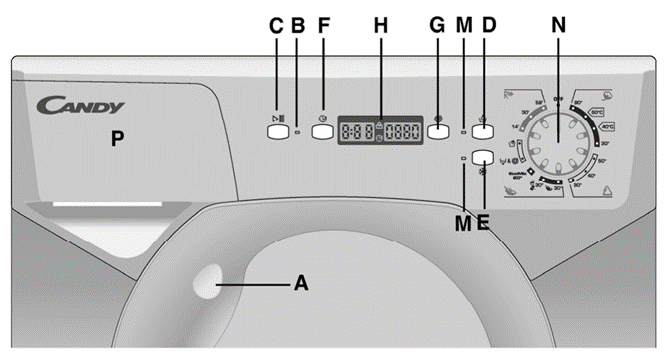
|
A - Door Handle
|
G - Spin Speed Button
|
|
B - Programme Start Light
|
H - Digital Display
|
|
C - Start Button
|
M - Buttons Indicator Light
|
|
D - Aquaplus Button
|
N - Timer Knob For Wash Programmes
|
|
E - Cold Wash Button
|
|
F - Start Delay Function
|
P - Detergent/Conditioner Drawer
|
|
A
|
Door Handle
|
Press the finger bar inside the door handle to open, remembering that there is a 2 minute safety delay after the wash cycle completes.
|
|
B
|
Start Light
|
Lights up after the Start Button has been pressed.
|
|
C
|
Start/Pause Button
|
Press to start the selected cycle.
To change the selected cycle press the Start/Pause button about 2 seconds until the display flashes, then select the correct cycle
and press the Start/Pause button again to continue the wash.
NOTE - There can be a short delay after pressing the button before the wash commences.
|
|
D
|
Aquaplus Button
|
If used, this button must be pressed before the Start Button.
This uses more water for the rinses to protect delicate fabrics, and is only needed for those people who are allergic to detergent etc.
Please do not use this mode unless absolutely necessary.
|
|
E
|
Cold Wash Button
|
This can modify any program to use only cold water, but all other settings are retained (times, water used etc.)
|
|
F
|
Delay Start Button
|
Press this button to increment the delay by 1 hour each press (up to 24 hours) As the machine should never be run when there is nobody in the
apartment this feature should not be used.
|
|
G
|
Spin Speed Button
|
The spin speed can be reduced by pressing this button at any time. NOTE: The spin speed cannot be increased.
If the load is unbalanced or too heavy the machine will not spin. Please do not overload the machine (4KG max)
|
|
H
|
Digital Display
|
Displays various info during the wash, such as spin speed, time remaining, door locked etc.
|
|
M
|
Buttons Indicator Light
|
This lights when the relevant buttons are pressed.
If an option is not compatible with the selected programme the light will flash and then go off.
|
|
N
|
Programme Selector with OFF Position
|
This is used to select the desired programme, and to switch the machine OFF.
To switch the machine OFF turn the dial to OFF.
A list of the various programmes is in the next table.
|
|
P
|
Detergent Drawer
|
Detergent should be added in the left side of the drawer, and conditioner/softener in the chamber on the right.
Always add an "AntiCal" tablet in the left side even if you choose not to use any detergent.
They can always be found on the shelf above the washing machine.
|
The Wash Programmes
|
Programme For :
|
Programme Selected
|
Max Weight (kg)
|
Temp OC
|
Detergent Used
|
Softener Used
|
|
Resistant Fabrics
Cotton / Linen
|
Whites
|
90oC
|
4
|
90oC
|
Y
|
Y
|
|
Cotton / Mixed
|
Fast
Coloureds
|
<60oC>
|
4
|
60oC
|
Y
|
Y
|
|
Fast
Coloureds
|
<40oC>
|
4
|
40oC
|
Y
|
Y
|
|
Non Fast
Coloureds
|
30oC
|
4
|
30oC
|
Y
|
Y
|
|
Mixed Fabrics
& Synthetics
Nylon, Perlon, Mixed Cotton
|
Fast
Coloureds
|
50oC
|
2
|
50oC
|
Y
|
Y
|
|
Non Fast
Coloureds
|
40oC
|
2
|
40o C
|
Y
|
Y
|
|
Mixed Delicate Synthetics
|
Shirts
|
30oC
|
2
|
30oC
|
Y
|
Y
|
|
Very Delicate Fabrics
|
Delicates
|
 30oC
30oC
|
2
|
30oC
|
Y
|
Y
|
|
"MACHINE WASHABLE"
Woolens
Hand Wash
|
 30oC
30oC
|
1
|
30oC
|
Y
|
Y
|
|
Specials
(Recommended)
|
EcoMix 20o
|
EcoMix 20o
|
4
|
20oC
|
Y
|
Y
|
|
Fast Spin /
Drain Only
|

|
-
|
-
|
-
|
-
|
|
Rinse
|

|
-
|
-
|
-
|
Y
|
|
Resistant or
Mixed Fabrics
|
14 mins
|
1
|
30oC
|
Y
|
Y
|
|
Resistant or
Mixed Fabrics
|
30 mins
|
2
|
30oC
|
Y
|
Y
|
|
Resistant Fabrics
|
59 mins
|
2
|
40o C
|
Y
|
Y
|
|
